
By AWS Solar, a licensed C-10 solar and electrical contractor serving Los Angeles and Ventura County
If you installed Tesla Powerwall 2 a few years ago, you have probably asked one of these two questions: “Can I add more battery without replacing everything?” or “One of my Powerwall 2 units failed. What can replace it?” Until recently, the honest answer was frustrating, because Powerwall 3 could not be added to a Powerwall 2 system.
That has changed. Starting with Powerwall software version 26.26, Tesla supports installing Powerwall 3 on an existing Powerwall 2 site with up to four Powerwall 2 units. Below we explain what is supported, what is not, how the system is wired, and what to check before you call an installer.
Powerwall 3 and Powerwall 2 Compatibility: Key Requirements
- Yes, Powerwall 3 now works with Powerwall 2, as long as your system has Powerwall software 26.26 or later.
- Largest combined system: up to 4 Powerwall 2 units, 1 Powerwall 3, and up to 3 Powerwall 3 Expansion units.
- You need Backup Gateway 2. Systems with the original Backup Gateway 1 are not compatible until the gateway is replaced.
- Your Powerwall 2 warranty is not affected. New Powerwall 3 and Expansion units come with their own 10-year warranty.
- Some systems must wait or take a different path, including Powerwall+ systems and systems that rely on Power Control System (PCS) settings.
Two Situations This Solves
1. You want more storage
Many homeowners who bought one or two Powerwall 2 units have since added an electric vehicle, a heat pump, an induction range, or a pool pump. The battery that covered the essentials in 2020 may not get you through the evening peak or a long outage today. You can now keep your existing Powerwall 2 batteries in place and add a Powerwall 3, plus Expansion units if you need even more capacity.
2. A Powerwall 2 needs to be replaced
Tesla’s announcement also covers systems where up to two Powerwall 2 units must be replaced. Instead of tearing out the whole system, Powerwall 3 can take the place of the failed units and work alongside the Powerwall 2 batteries that are still healthy.
How a Combined Powerwall 2 + Powerwall 3 System Is Wired
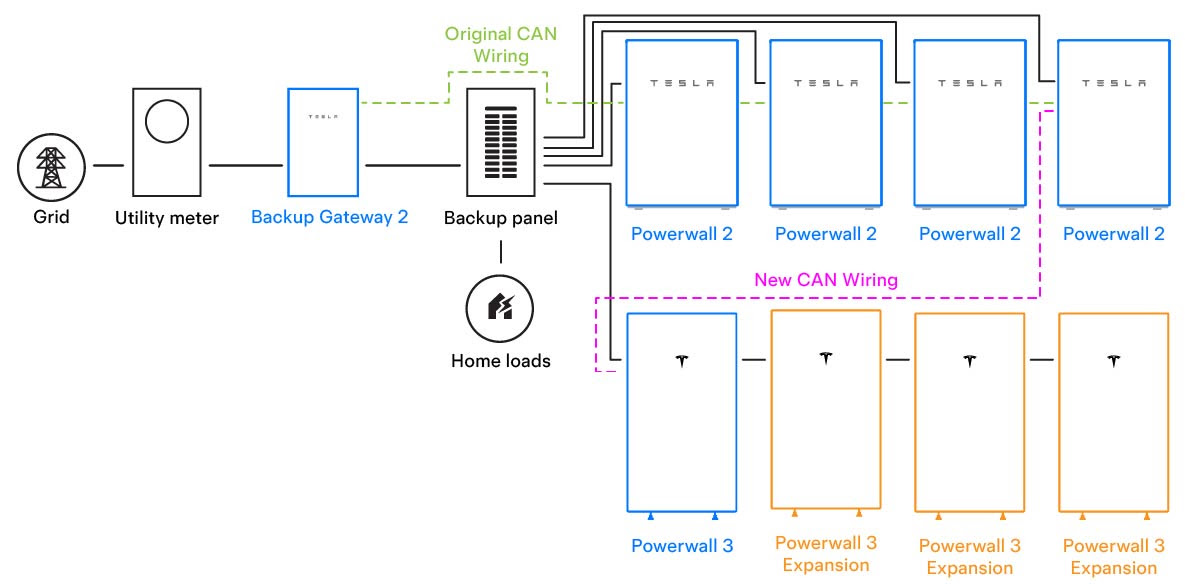
Here is how to read the diagram, from left to right:
- Grid and utility meter. Power from SCE, LADWP or your local utility comes through your meter as it does today.
- Backup Gateway 2. The gateway stays in place. It disconnects your home from the grid during an outage and controls the batteries.
- Backup panel and home loads. The backup panel feeds the circuits you want powered during an outage. Each Powerwall 2 and the new Powerwall 3 has its own circuit in this panel (the solid black lines).
- Existing Powerwall 2 units. Up to four Powerwall 2 units keep their original power circuits and their original CAN communication wiring from the gateway (the green dashed line).
- New Powerwall 3. One Powerwall 3 connects to the backup panel and links to the Powerwall 2 string with new CAN communication wiring (the pink dashed line).
- Powerwall 3 Expansion units. Up to three Expansion units connect directly to the Powerwall 3 to add storage capacity.
In practice, this means the work is mostly on the new equipment side: a new battery circuit in the backup panel, new communication wiring, Expansion connections, and a software configuration. Your existing Powerwall 2 installation is left largely as it is.
Requirements at a Glance
| Item | Requirement |
|---|---|
| Powerwall software | Version 26.26 or later |
| Tesla One installer app | Version 25.46 or later |
| Gateway | Backup Gateway 2 (Gateway 1 not supported) |
| Existing Powerwall 2 units | Up to 4 |
| New equipment | 1 Powerwall 3 + up to 3 Powerwall 3 Expansion units |
| Metering | Neurio meters not supported |
| Three-phase service | Powerwall 3 output limited to 5 kW |
| Installer | Must be installed by a Tesla Certified Installer |
What Is Not Compatible (Yet)
Tesla lists several configurations that cannot use the mixed Powerwall 2 / Powerwall 3 setup at this time:
- More than four Powerwall 2 units. Larger Powerwall 2 systems are not supported in this configuration.
- Powerwall+ systems. Powerwall+ (the version with a built-in solar inverter) cannot be mixed with Powerwall 3. Tesla’s guidance is to replace all Powerwall+ units with Powerwall 3.
- Backup Gateway 1. Older systems with Gateway 1 must replace it with Backup Gateway 2, where available, before adding Powerwall 3.
- Neurio meters. Sites that use Neurio metering are not supported.
An important note for PCS systems
Some Powerwall systems are set up with a Power Control System (PCS). PCS limits how much power the system can send to your panel or the grid. Installers often use it to avoid a main panel upgrade or to meet utility export limits. Tesla says Powerwall 3 should not be added to Powerwall 2 systems that must comply with PCS standards until UL 3141 compliance is confirmed, which is expected later in 2026.
Most homeowners do not know whether their system uses PCS. It is usually noted on the permit plans or the system’s single-line diagram. We check this before quoting so you do not pay for an upgrade that cannot be commissioned yet.
How to Check If Your System Qualifies
You can do a quick pre-check yourself before calling an installer:
- Count your Powerwall 2 units. Four or fewer is required.
- Confirm it is Powerwall 2, not Powerwall+. Powerwall+ has a solar inverter built in, and solar wiring connects directly to the battery. Your original contract or the label on the unit will say which one you have.
- Look at your gateway. Take a photo of the gateway label. Backup Gateway 2 is required.
- Check your software version in the Tesla app. Version 26.26 or later is required, and your installer can update it during the upgrade.
- Find your permit plans if you have them. They show whether the system uses PCS, and help your installer plan the new battery circuit.
Send photos of your gateway label, Powerwall labels and main electrical panel to AWS Solar, and we will confirm compatibility and give you an itemized quote for your specific site.
Permits, Utility Paperwork and Rebates
Adding Powerwall 3 is new energy storage equipment, so it needs a building and electrical permit from your city or county and an updated connection agreement with your utility. According to Tesla, only the CEC listing for Powerwall 3 is needed. If your older Powerwall 2 CEC listing has expired, your existing system remains compliant, and the new Powerwall 3 and Expansion units are installed under a new connection agreement.
Depending on your utility and address, the new battery capacity may also qualify for local storage incentives. We review what applies to your home when we prepare your proposal.
Frequently Asked Questions
Is Powerwall 3 compatible with Powerwall 2?
Yes. Beginning with Powerwall software version 26.26, Powerwall 3 can be installed on an existing Powerwall 2 site with up to four Powerwall 2 units, using Backup Gateway 2.
How many batteries can a combined system have?
Up to four Powerwall 2 units, one Powerwall 3, and up to three Powerwall 3 Expansion units.
Will adding Powerwall 3 affect my Powerwall 2 warranty?
No. Powerwall 2 keeps its original warranty. Powerwall 3 and Powerwall 3 Expansion units include a 10-year warranty.
I have Backup Gateway 1. Can I still add Powerwall 3?
Not as it is. Gateway 1 must be replaced with Backup Gateway 2, where available, before Powerwall 3 can be added.
Can I mix Powerwall+ with Powerwall 3?
No. Powerwall+ systems are not supported in a mixed configuration. Tesla recommends replacing all Powerwall+ units with Powerwall 3.
Can a failed Powerwall 2 be replaced with Powerwall 3?
Yes. The mixed configuration is designed to cover systems where up to two Powerwall 2 units must be replaced.
Ready to Expand Your Powerwall 2 System?
AWS Solar designs, permits and installs Tesla Powerwall systems for homeowners across Los Angeles and Ventura County. Learn more about Tesla Powerwall 3 installation and our battery backup systems, or send us photos of your current setup for a free compatibility check.
Source: Tesla Support, Powerwall 3 Compatibility With Powerwall 2 and Tesla’s Powerwall Application Note, “Installing Powerwall 3 in an Existing Powerwall 2 System.” Specifications and supported configurations may change. Final eligibility depends on a site inspection.